Custom Bates Number Formats: Prefixes, Suffixes & Templates
Master the art of custom Bates number formatting. Learn how to create professional document identification systems using prefixes, suffixes, and templates that meet court requirements and organizational standards.
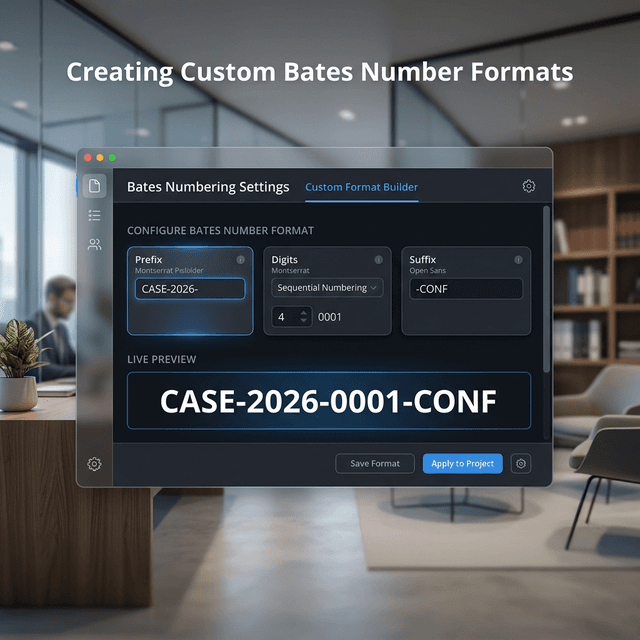
Understanding Bates Number Format Components
A Bates number is more than just a sequential number—it's a structured identifier that can convey significant information about a document. Understanding the components of Bates number formats allows you to create identification systems that serve multiple purposes simultaneously.
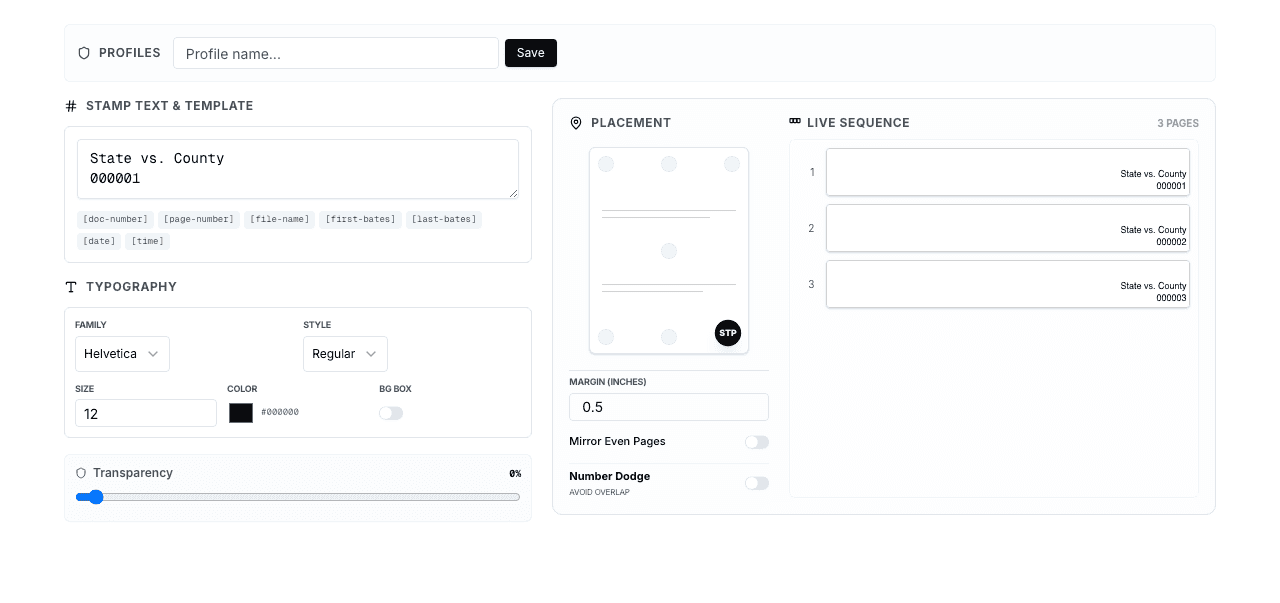
Standard Bates number anatomy:
[PREFIX] + [NUMBER] + [SUFFIX]

Example: ABC-2024-000001-CONF
         ↓    ↓      ↓      ↓
      Prefix Year  Number Suffix
Each component serves a specific purpose:
- Prefix: Identifies case, party, custodian, or document type
- Number: Provides unique sequential identification
- Suffix: Adds classification, confidentiality, or version information
Key Principle
Custom formats should balance information density with readability. A Bates number that's too complex becomes difficult to reference and cite in legal documents.
Prefix Strategies
Case-Based Prefixes
The most common prefix strategy uses case identifiers to distinguish documents from different matters:
Examples:
- Case number: CV2024-12345-000001
- Case abbreviation: SMITHVJONES-000001
- Matter code: MAT-2024-001-000001
- Client code: ACME-LIT-000001
Case-based prefixes are essential when your firm handles multiple matters simultaneously. They prevent confusion and make it immediately clear which case a document belongs to.
Party-Based Prefixes
In litigation, identifying which party produced a document is often critical:
Examples:
- Plaintiff production: PLF-000001
- Defendant production: DEF-000001
- Third-party production: TP-ACME-000001
- Multiple defendants: DEF1-000001, DEF2-000001
Party-based prefixes are particularly useful in multi-party litigation where tracking document sources is essential for privilege reviews and production tracking.
Custodian-Based Prefixes
When document custodian identity matters, incorporate custodian information into the prefix:
Examples:
- Last name: SMITH-000001
- Initials: JDS-000001 (John D. Smith)
- Employee ID: EMP-12345-000001
- Department: LEGAL-SMITH-000001
Custodian-based prefixes help during privilege reviews and make it easy to identify all documents from a specific individual.
Document Type Prefixes
Some organizations prefer to identify document types in the Bates number:
Examples:
- Email: EMAIL-000001
- Contract: CNTR-000001
- Invoice: INV-000001
- Correspondence: CORR-000001
Document type prefixes facilitate quick identification and can support automated document classification systems.
Hybrid Prefix Approaches
Many organizations combine multiple elements in their prefixes:
Examples:
- Case + Party: CV2024-PLF-000001
- Case + Custodian: SMITHVJONES-SMITH-000001
- Party + Type: DEF-EMAIL-000001
- Client + Matter + Party: ACME-001-PLF-000001
Balance Warning
While hybrid prefixes provide more information, they also create longer Bates numbers that are harder to cite and reference. Keep prefixes concise—typically 3-15 characters maximum.
Number Format Options
Digit Count
The number of digits in your Bates numbers should accommodate your expected document volume:
Common digit counts:
- 4 digits (0001-9999): Small productions up to 10,000 pages
- 5 digits (00001-99999): Medium productions up to 100,000 pages
- 6 digits (000001-999999): Large productions up to 1 million pages
- 7 digits (0000001-9999999): Very large productions or long-term archival
- 8 digits (00000001-99999999): Enterprise-scale document management
Best practice: Choose a digit count that provides at least 2-3x your expected document volume. If you expect 50,000 pages, use 6 digits (capacity for 1 million pages) to allow for unexpected growth.
Leading Zeros
Leading zeros are standard in Bates numbering for several important reasons:
- Consistent length: All numbers have the same character count
- Proper sorting: Numbers sort correctly in file systems and databases
- Professional appearance: Uniform formatting looks more polished
- OCR reliability: Fixed-width numbers are easier for OCR systems to recognize
Example comparison:
Without leading zeros:    With leading zeros:
BATES1                   BATES000001
BATES10                  BATES000010
BATES100                 BATES000100
BATES1000                BATES001000

Sorting issues ❌         Sorts correctly ✅
Separator Characters
Separators between prefix, number, and suffix improve readability:
Common separators:
- Hyphen: ABC-000001-CONF (most common)
- Underscore: ABC_000001_CONF
- Period: ABC.000001.CONF
- No separator: ABC000001CONF (less readable)
Hyphens are the most widely used separator because they're easy to read and don't cause issues in file systems or databases.
Suffix Strategies
Confidentiality Designations
Suffixes commonly indicate confidentiality levels:
Examples:
- Confidential: BATES000001-CONF
- Highly Confidential: BATES000001-HC
- Attorney Eyes Only: BATES000001-AEO
- Public: BATES000001-PUB
Confidentiality suffixes help ensure proper handling and can support automated redaction or access control systems.
Version Indicators
When documents have multiple versions, suffixes can track versions:
Examples:
- Version number: BATES000001-V1, BATES000001-V2
- Draft status: BATES000001-DRAFT, BATES000001-FINAL
- Revision date: BATES000001-20240115
Production Batch Indicators
For productions delivered in multiple batches:
Examples:
- Batch number: BATES000001-B1, BATES000001-B2
- Production date: BATES000001-20240301
- Supplemental: BATES000001-SUPP
Industry-Specific Format Examples
Law Firm Litigation
Format: [CASE]-[PARTY]-[NUMBER]
Example: SMITHVJONES-PLF-000001

Benefits:
- Clear case identification
- Party attribution
- Simple and readable
Corporate Legal Department
Format: [COMPANY]-[MATTER]-[CUSTODIAN]-[NUMBER]
Example: ACME-INV2024-SMITH-000001

Benefits:
- Company identification
- Matter tracking
- Custodian attribution
- Internal investigation support
Medical Records
Format: [FACILITY]-[PATIENT-ID]-[NUMBER]-[HIPAA]
Example: HOSP-PT12345-000001-HIPAA

Benefits:
- Facility identification
- Patient tracking (de-identified)
- HIPAA compliance indicator
Real Estate Transactions
Format: [PROPERTY]-[TRANSACTION]-[DOCTYPE]-[NUMBER]
Example: 123MAIN-SALE2024-DEED-000001

Benefits:
- Property identification
- Transaction tracking
- Document type classification
Government Agency
Format: [AGENCY]-[YEAR]-[CASE]-[NUMBER]-[CLASS]
Example: DOJ-2024-CV12345-000001-CONF

Benefits:
- Agency identification
- Year tracking
- Case reference
- Classification level
Creating Your Custom Format Template
Step 1: Define Your Requirements
Before creating a custom format, answer these questions:
- What information must be immediately identifiable from the Bates number?
- How many documents do you expect to process?
- Are there court-mandated format requirements?
- Do you need to track confidentiality levels?
- Will you have multiple productions or batches?
- Do you need custodian or party attribution?
Step 2: Choose Your Components
Select the components that meet your requirements:
- Prefix: Case identifier, party, custodian, or document type
- Number: Digit count based on expected volume
- Suffix: Confidentiality, version, or batch indicator (optional)
- Separators: Hyphens, underscores, or periods
Step 3: Test Your Format
Before processing thousands of documents, test your format:
- Create sample Bates numbers with your format
- Verify they're easy to read and cite
- Check that they sort correctly in file systems
- Ensure they meet any court requirements
- Confirm they're not too long or complex
Step 4: Document Your Standard
Create documentation for your custom format:
- Format specification and examples
- Component definitions
- When to use different prefixes or suffixes
- Numbering conventions
- Special cases and exceptions
Pro Tip
Once you establish a custom format for a case or matter, maintain consistency throughout the entire production. Changing formats mid-production creates confusion and can cause citation errors.
Common Format Mistakes to Avoid
Mistakes That Cause Problems
- Too complex: ABC-2024-SMITHVJONES-PLF-SMITH-EMAIL-000001-CONF-V1 is unmanageable
- No leading zeros: Numbers sort incorrectly (BATES1, BATES10, BATES2)
- Inconsistent separators: Mixing ABC-000001 and ABC_000002 in the same production
- Insufficient digits: Running out of numbers mid-production
- Special characters: Using characters that cause file system issues (/, \, :, *, ?, ", <, >, |)
- Spaces: Including spaces that complicate file naming and database storage
- Ambiguous abbreviations: Using abbreviations that aren't clearly defined
Implementing Custom Formats with BatesFast
BatesFast supports flexible custom Bates number formats:
- Custom prefixes: Add any text prefix to identify your documents
- Flexible digit counts: Choose 4-8 digits based on your needs
- Optional suffixes: Add confidentiality or classification indicators
- Separator options: Use hyphens, underscores, or no separators
- Format preview: See how your custom format looks before processing
- Template saving: Save custom formats for reuse across productions
The browser-based interface makes it easy to experiment with different formats and find the perfect balance of information and readability for your specific needs.
Frequently Asked Questions
How long should a Bates number be?
Aim for 10-20 characters total, including prefix, number, and suffix. Longer numbers become difficult to cite and reference in legal documents. Balance information content with practical usability.
Can I change my Bates number format mid-production?
While technically possible, changing formats mid-production is strongly discouraged. It creates confusion, complicates citation, and may require re-stamping documents. Establish your format before beginning production and maintain consistency throughout.
Should I include the year in my Bates number prefix?
Including the year is helpful for long-running cases or when managing multiple matters. It provides immediate temporal context. However, for single-year matters, the year may be unnecessary and adds length to the Bates number.
What's the best separator character to use?
Hyphens (-) are the most common and widely accepted separator. They're easy to read, don't cause file system issues, and are standard in legal practice. Avoid spaces, slashes, and special characters that may cause technical problems.
How many digits should I use for the sequential number?
Use 6 digits for most productions (capacity: 1 million pages). This provides ample room for growth. Use 7-8 digits only for very large productions or enterprise document management systems. Fewer than 6 digits risks running out of numbers.
Should I use uppercase or lowercase in prefixes?
Uppercase is standard in legal practice and provides better readability. It also ensures consistency across different systems and platforms. Maintain consistent capitalization throughout your production.
Can I use different formats for different document types in the same production?
While possible, using different formats within a single production can create confusion. If you need to distinguish document types, use a consistent format with different prefixes (EMAIL-000001, CNTR-000001) rather than completely different formats.
Are there court-mandated Bates number format requirements?
Some courts and jurisdictions have specific requirements for Bates number formats. Always check local rules, standing orders, and any case-specific production protocols before establishing your format. When in doubt, consult with opposing counsel or the court.
Conclusion
Custom Bates number formats transform simple sequential numbers into powerful document identification systems. By thoughtfully combining prefixes, numbers, and suffixes, you create Bates numbers that convey essential information while maintaining readability and professional appearance.
The key to successful custom formatting is balance: include enough information to serve your organizational needs without creating numbers so complex they become difficult to use. Test your format thoroughly before production, document your standards clearly, and maintain consistency throughout your matter.
Whether you're handling a simple litigation matter or managing complex multi-party productions, custom Bates number formats give you the flexibility to create identification systems that work for your specific requirements while meeting professional and court standards.
Ready to Create Custom Bates Number Formats?
Try BatesFast's flexible formatting options with custom prefixes, suffixes, and templates for professional document identification. Start with one free preview run, then $299 one-time purchase.
Start Customizing Now