Bates Numbering: The Complete Guide to Bates Stamping for Legal Professionals (2026)
Everything you need to know about Bates numbering and Bates stamping in one comprehensive resource. From definitions and history to step-by-step tutorials, FRCP Rule 34 compliance, best practices from the Sedona Conference, and tool comparisons — this is the definitive guide for legal professionals, paralegals, and litigation support teams.

Table of Contents
- What Is Bates Numbering?
- Bates Stamping vs Bates Numbering
- History of Bates Numbering
- Why Bates Numbering Matters for Legal Professionals
- How to Add Bates Numbers to PDF (Step-by-Step)
- Bates Number Format Best Practices
- Bates Numbering for Litigation & Discovery
- Bates Numbering Tools Compared (2026)
- Security & Privacy
- Advanced Techniques
- Frequently Asked Questions (16 Answers)
- Get Started with BatesFast
1. What Is Bates Numbering?
Bates numbering is a unique sequential identification system used to label and organize legal documents. Each page in a document set receives a unique number — typically a prefix followed by a zero-padded sequential number — creating a permanent, unambiguous reference that allows any page to be instantly located, cited, and verified.
A typical Bates number looks like this: ABC-000001. The prefix “ABC” identifies the producing party or case, and the sequential number “000001” uniquely identifies the page. Every subsequent page receives the next number in sequence: ABC-000002, ABC-000003, and so on. Applying these numbers at scale is exactly what dedicated Bates numbering software automates.
Bates numbering is also commonly called Bates stamping, and the numbers themselves are called Bates numbers, Bates stamps, or Bates labels. The process of applying these numbers to documents is known as Bates stamping a PDF or Bates numbering a document.
Key Characteristics of Bates Numbers
- Unique: No two pages in a production share the same Bates number
- Sequential: Numbers follow a continuous, unbroken sequence
- Permanent: Once applied, numbers become part of the document record
- Identifiable: Prefixes identify the producing party, case, or document set
- Standardized: Follow consistent formatting across an entire production
For a deeper exploration of Bates numbering fundamentals, see our dedicated guide: What is Bates Numbering? Complete Guide for Legal Professionals.
2. Bates Stamping vs Bates Numbering: What's the Difference?
Bates stamping and Bates numbering refer to the same process and are used interchangeably in modern legal practice.The distinction is purely historical: “Bates stamping” originally described the physical act of pressing a mechanical stamp onto paper, while “Bates numbering” described the broader system of sequential page identification.
| Aspect | Bates Stamping | Bates Numbering |
|---|---|---|
| Historical meaning | Physical mechanical stamp | Sequential identification system |
| Modern meaning | Same as Bates numbering | Same as Bates stamping |
| Usage context | More common in practice | More common in software |
| Search volume | 1,600/month | 2,900/month |
| Applies to physical docs? | Yes | Yes |
| Applies to digital PDFs? | Yes | Yes |
In court filings, depositions, and legal correspondence, you'll encounter both terms. Attorneys might say “Bates stamp the documents” or “apply Bates numbers” — they mean exactly the same thing. Software tools typically use “Bates numbering” in their feature descriptions.
For a full comparison of the terminology, see: Bates Stamping vs Bates Numbering: Understanding the Difference.
3. The History of Bates Numbering
Bates numbering was invented by Edwin G. Bates, who patented the Bates Automatic Numbering Machine between 1891 and 1893. His mechanical stamp could imprint a sequential number on paper and automatically advance to the next number after each impression — a revolutionary innovation for document organization.
Timeline: Evolution of Bates Numbering
The Bates Manufacturing Company was eventually acquired by Avery Dennison, but the “Bates” name became so synonymous with sequential document numbering that it remains the universal term over 130 years later.
Read the full history: The History of Bates Numbering: From Mechanical Stamps to Digital Tools.
4. Why Bates Numbering Matters for Legal Professionals
Bates numbering is essential because it provides an unambiguous, universally understood system for identifying every page in a legal document production. Without Bates numbers, referring to specific pages in depositions, court filings, or settlement negotiations would be imprecise and error-prone.
FRCP Rule 34: Federal Requirements
FRCP Rule 34(b)(2)(E) governs document production in federal civil litigation. It requires that documents be produced either “as they are kept in the usual course of business” or “organized and labeled to correspond to the categories in the request.” Bates numbering is the universally accepted method for satisfying this labeling requirement.
Failure to properly organize document productions with Bates numbers can result in court sanctions, adverse inferences, or orders to re-produce documents — all of which cost time and money.
The Sedona Conference Guidelines
The Sedona Conference, a leading legal policy think tank, publishes widely cited principles for electronic document production. Their guidelines specifically recommend Bates numbering as a best practice for document production in litigation, emphasizing consistent formatting, sequential numbering without gaps, and clear identification of producing parties.
Core Benefits
Precise Page Reference
During depositions and hearings, attorneys can direct witnesses to exact pages using Bates numbers. “Please turn to ABC-004523” eliminates ambiguity.
Chain of Custody
Bates numbers create an audit trail proving document integrity. Any missing or altered pages become immediately apparent through gaps in the sequence.
Discovery Management
Privilege logs, production indices, and deposition exhibit lists all reference Bates number ranges, enabling efficient document tracking across large cases.
Court Compliance
Federal and state courts expect Bates-numbered productions. Unnumbered or improperly numbered documents can lead to sanctions or motions to compel.
Learn more: Why Legal Professionals Need Bates Numbering in 2026 and Bates Numbering Requirements by State.
5. How to Add Bates Numbers to PDF: Step-by-Step Tutorial
Adding Bates numbers to a PDF takes less than 60 seconds with BatesFast. No software installation, no account creation, no configuration files. Open your browser and start immediately.
Open BatesFast in Your Browser
Navigate to BatesFast in any modern browser — Chrome, Firefox, Safari, or Edge on Mac, Windows, Linux, or ChromeOS. No installation or plugin required.
Configure Your Bates Number Format
Set your prefix (e.g., “ABC-”), number of digits (6–8 recommended), optional suffix, font, size, color, and position on the page. BatesFast previews your format in real time.
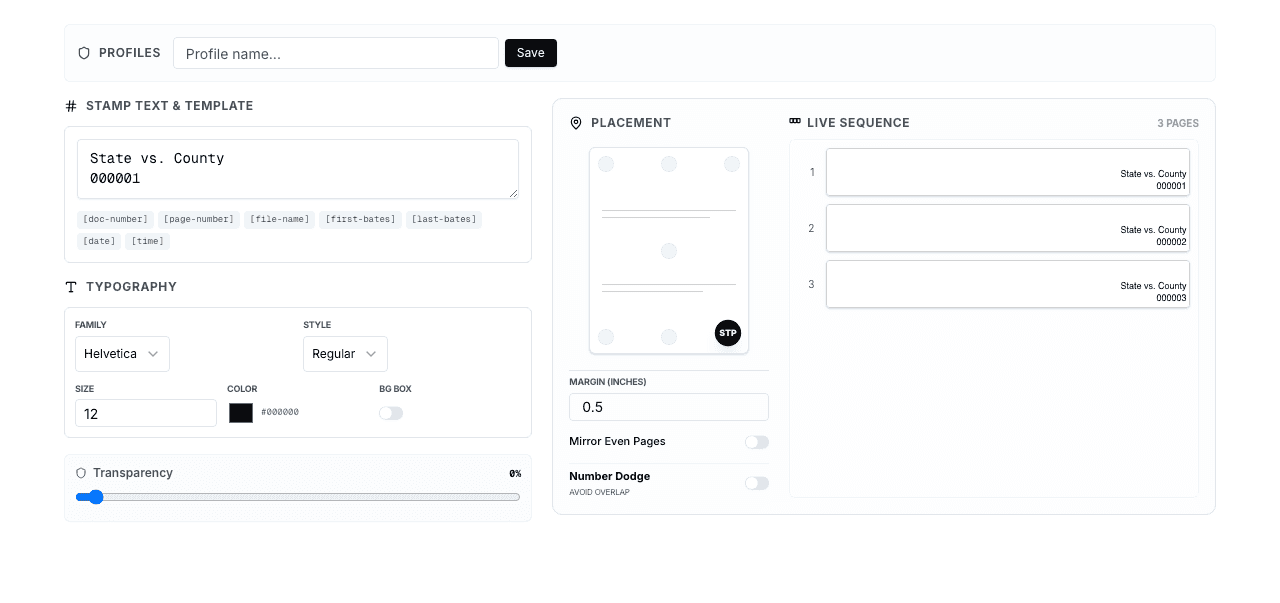
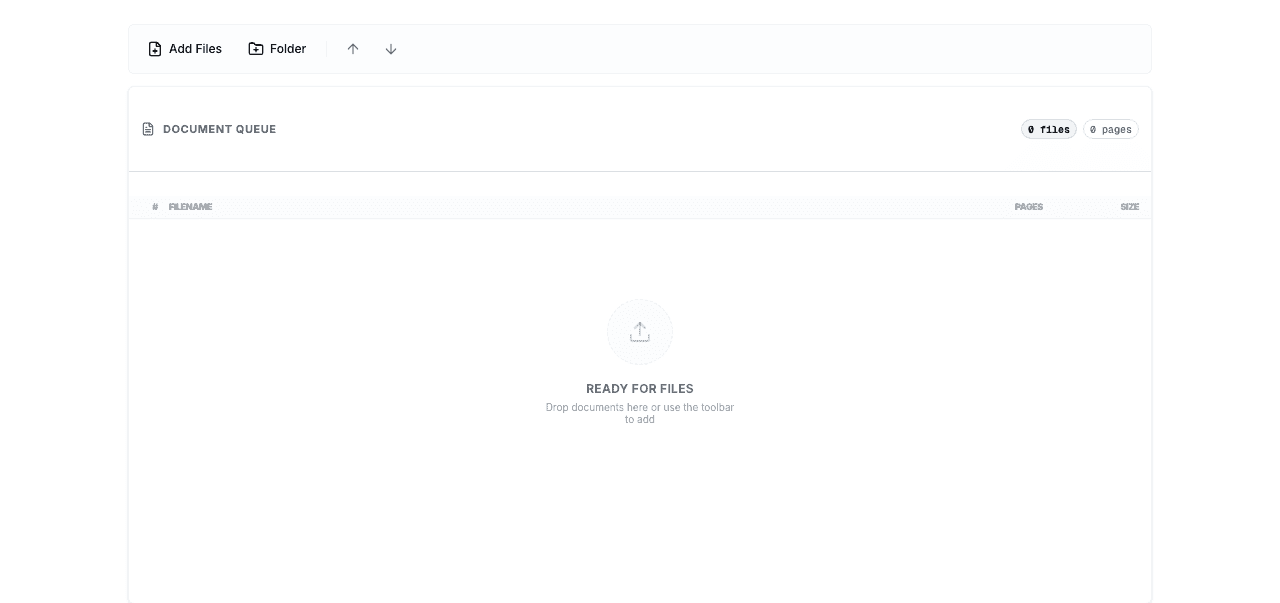
Upload Your PDF Files
Drag and drop one or more PDF files. BatesFast accepts files of any size and processes them entirely in your browser — your documents never leave your computer.
Set the Starting Number
Enter the starting Bates number for this batch. If you're continuing from a previous production, enter the next number in sequence to maintain continuity.
Process Your Documents
Click process. BatesFast's WebAssembly engine stamps every page in seconds — a 1,000-page document processes in approximately 3–5 seconds. Sequential numbering continues automatically across multiple files.
Download Your Stamped PDFs
Download individual files or a ZIP archive containing all processed documents. Optionally enable file renaming to include Bates number ranges in filenames, or generate Avery label sheets for physical documents.
💡 Pro Tip
Before processing a large batch, test your settings on a single document to verify format, position, and font settings are correct. This prevents having to re-process hundreds of pages.
For a detailed walkthrough with screenshots, see: How to Add Bates Numbers to PDF Documents (Step-by-Step Guide). New to Bates numbering? Start with Bates Numbering for Beginners.
6. Bates Number Format Best Practices
Following established Bates numbering best practices prevents costly errors, court sanctions, and production disputes.These 10 guidelines are drawn from the Sedona Conference principles, Consilio's litigation support standards, and decades of legal industry practice.
1. Use Consistent, Meaningful Prefixes
Choose a prefix that identifies the producing party or case. Common conventions include party abbreviations (SMITH), case numbers (CV2026), or matter codes (MAT-A). Once set, never change the prefix mid-production.
2. Use Sufficient Zero-Padding (6–8 Digits)
Always pad Bates numbers with leading zeros. Use at least 6 digits for standard cases and 8 digits for large litigation matters. Starting with ABC-000001 instead of ABC-1 ensures proper sorting and prevents overflow if the document set grows beyond expectations.
3. Start at 000001, Not 000000
Begin numbering at 1, not 0. Starting at zero creates confusion about whether a page was intentionally numbered or represents an error. The Sedona Conference recommends starting at 000001.
4. Maintain Sequential Numbering Without Gaps
Never skip numbers in a production sequence. Gaps in Bates numbers raise red flags — opposing counsel may argue that documents were withheld. If documents are removed for privilege, note the gap in your privilege log with the reason.
5. Avoid Special Characters in Prefixes
Stick to letters, numbers, and hyphens. Avoid spaces, slashes, dots, and other special characters that can cause issues with file systems, databases, and e-discovery platforms.
6. Place Numbers Consistently
The bottom-right corner is the industry standard. Whatever position you choose, maintain it consistently across all documents in a production. Never mix positions within the same production set.
7. Use a Legible Font and Size
Choose a clear, readable font at 8–10pt size. The number should be visible without magnification but not so large that it interferes with document content. Courier, Arial, and Helvetica are common choices.
8. Document Your Bates Number Ranges
Maintain a production log mapping each document to its Bates number range. Record the document name, date, page count, and corresponding Bates range (e.g., Contract.pdf → ABC-000001 to ABC-000025). BatesFast can generate this log automatically.
9. Plan for Production Growth
Estimate the total number of pages across all potential productions before choosing your digit count. It's better to use 8 digits from the start than to realize you need more digits mid-production and face formatting inconsistencies.
10. Keep Format Documentation
Record your Bates numbering conventions (prefix, digit count, font, position, color) in a case management document. This ensures consistency when multiple team members or subsequent productions are involved.
For detailed format examples and templates, see: Creating Custom Bates Number Formats: Prefixes, Suffixes, and Templates.
7. Bates Numbering for Litigation & Discovery
In litigation, Bates numbering is the standard method for organizing document productions, creating privilege logs, and managing discovery. Every federal court and most state courts expect Bates-numbered document productions as part of the discovery process.
FRCP Rule 34 Compliance
FRCP Rule 34 governs requests to produce documents in federal litigation. Rule 34(b)(2)(E) specifically addresses production format: documents must be produced “as they are kept in the usual course of business” or “organized and labeled to correspond to the categories in the request.”
Bates numbering satisfies the “organized and labeled” requirement by assigning a unique, permanent identifier to every page. When a discovery request asks for “all contracts between 2020 and 2025,” the producing party can respond with “See documents ABC-003200 through ABC-004150” — a precise, verifiable reference.
Common Litigation Scenarios
Document Production
The most common use — applying Bates numbers to documents before producing them to opposing counsel. Each production set receives a unique prefix.
Privilege Logs
Privilege logs reference withheld documents by Bates number range, describing the document and the privilege claimed (attorney-client, work product, etc.).
Deposition Exhibits
Attorneys reference Bates-numbered pages when questioning witnesses: “I'm directing your attention to ABC-002345. Can you identify this document?”
Trial Exhibits
Trial exhibit lists cross-reference exhibit numbers to Bates ranges, allowing judges and juries to locate specific pages within large document sets.
Sedona Conference Recommendations
The Sedona Conference's “Best Practices Commentary on the Use of Search and Information Retrieval Methods in E-Discovery” recommends several practices for Bates numbering in electronic discovery:
- Use consistent Bates numbering conventions across all productions in a case
- Include the producing party identifier in the Bates prefix
- Maintain a comprehensive production log with Bates ranges
- Coordinate numbering schemes with opposing counsel when multiple parties produce documents
- Preserve original document metadata alongside Bates-stamped versions
For an in-depth guide to litigation-specific Bates numbering, see: Bates Numbering for Litigation: Discovery Document Management Guide.
8. Bates Numbering Tools Compared (2026)
BatesFast is the best Bates numbering tool for most legal professionals in 2026, offering the best combination of features, security, and value. Here's how the top five Bates numbering software options compare. For a full evaluation framework, see our guide on how to choose Bates numbering software:
| Feature | BatesFast | Adobe Acrobat Pro | Bluebeam Revu | Foxit PDF Editor | DeftPDF |
|---|---|---|---|---|---|
| Price | $299 one-time | $24.99/mo | $240/yr | $179.99/yr | Free (limited) |
| Recurring Fees | None — ever | $299.88/yr | $240/yr | $179.99/yr | Free tier limited |
| Platform | Any browser | Windows/Mac | Windows only | Windows/Mac | Browser |
| Installation Required | No | Yes | Yes | Yes | No |
| Security Model | Client-side | Local | Local | Local | Cloud upload |
| Batch Processing | ✓ | ✓ | ✓ | ✓ | ✗ |
| Custom Formats | ✓ | ✓ | ✓ | Limited | Limited |
| Label Generation | ✓ | ✗ | ✗ | ✗ | ✗ |
| File Renaming | ✓ | ✗ | ✗ | ✗ | ✗ |
| Learning Curve | Minimal | Steep | Moderate | Moderate | Minimal |
| Free Tier | 1 free run | 7 days | 30 days | 14 days | Free tier |
What Users Say About Competitors
Adobe Acrobat Pro — $24.99/month (G2 & Capterra Reviews)
- • “Crashes a few times a week losing all changes” — G2 reviewer
- • “Lags and crashes when working with large numbers of documents” — Capterra
- • “Subscription fees are not reasonable” — G2, with 183 mentions of “expensive”
- • “Interface can feel overloaded for new users” — G2, 109 mentions
- • Full PDF editor with Bates numbering buried in menus — overkill for stamping
Bluebeam Revu — $240/year subscription
- • Designed for construction and engineering — not purpose-built for legal
- • Windows-only — excludes Mac, Linux, and ChromeOS users entirely
- • Expensive annual subscription with no one-time purchase option
- • Steep learning curve with features most legal professionals never use
DeftPDF — Free tier (cloud-based)
- • Uploads documents to cloud servers — major security risk for confidential legal files
- • Limited formatting options and no batch processing
- • Free tier has file size restrictions
- • Not suitable for attorney-client privileged documents
💡 Bottom Line
If you need Bates numbering, BatesFast is the best value in 2026. At $299 one-time (versus $300+/year for Adobe or $240/year for Bluebeam), you get purpose-built features, client-side security, and zero recurring costs. Volume discounts are available for teams of 10+.
For detailed comparisons, see: Adobe Acrobat vs BatesFast and Best Free Bates Numbering Software in 2026.
9. Security & Privacy in Bates Numbering
Security is non-negotiable when processing confidential legal documents. Attorney-client privileged materials, trade secrets, medical records, and other sensitive documents require the highest level of protection during Bates numbering.
The Problem with Cloud-Based Tools
Many online Bates numbering tools upload your documents to remote servers for processing. This means your confidential legal documents travel across the internet, are stored (even temporarily) on third-party servers, and could potentially be accessed by unauthorized parties. For documents protected by attorney-client privilege, this creates serious ethical and compliance concerns.
How BatesFast Protects Your Documents
BatesFast uses a fundamentally different approach: 100% client-side processing. Your documents are processed entirely in your browser using WebAssembly (compiled from Rust). No data is ever uploaded, transmitted, or stored on any server.
No Upload
Documents never leave your computer. All processing happens in your browser's memory.
No Storage
No files are stored on any server — ever. When you close the tab, the data is gone from memory.
No Tracking
No telemetry, no usage tracking, no document analytics. Your work remains completely private.
Compliance Considerations
- HIPAA: Medical records Bates-numbered with BatesFast never leave the local machine, supporting HIPAA compliance requirements for protected health information
- Attorney-client privilege: Client-side processing eliminates the risk of privileged documents being exposed through server breaches or unauthorized access
- Data sovereignty: Documents remain on your computer in your jurisdiction — no cross-border data transfers to worry about
- Firm security policies: Many law firms prohibit uploading client documents to third-party services. BatesFast's client-side approach complies with even the strictest policies
Read more about security: Bates Numbering Security: Why Client-Side Processing Matters. For HIPAA-specific guidance, see: Medical Records and Bates Numbering: HIPAA-Compliant Document Management.
10. Advanced Bates Numbering Techniques
Beyond basic sequential numbering, advanced techniques help legal teams handle complex production requirements efficiently. These features are particularly valuable for large litigation matters, multi-party cases, and ongoing productions.
Batch Processing Large Document Sets
When processing hundreds or thousands of documents, batch processing saves hours of manual work. Upload all PDFs at once, and BatesFast automatically applies sequential Bates numbers across the entire set. A 5,000-page batch processes in approximately 15–20 seconds.
See our detailed guide: How to Batch Process Multiple PDFs with Bates Numbers.
Template Variables
BatesFast supports template variables in stamp text, allowing you to include dynamic information alongside Bates numbers. Available variables include the original filename, page number within the document, total page count, and processing date. This adds context to each stamp without manual entry.
File Renaming with Bates Ranges
BatesFast can automatically rename output files to include Bates number ranges in the filename. For example, “Contract.pdf” becomes “ABC-000001_ABC-000025_Contract.pdf.” This makes it easy to identify which Bates numbers correspond to which document without opening each file.
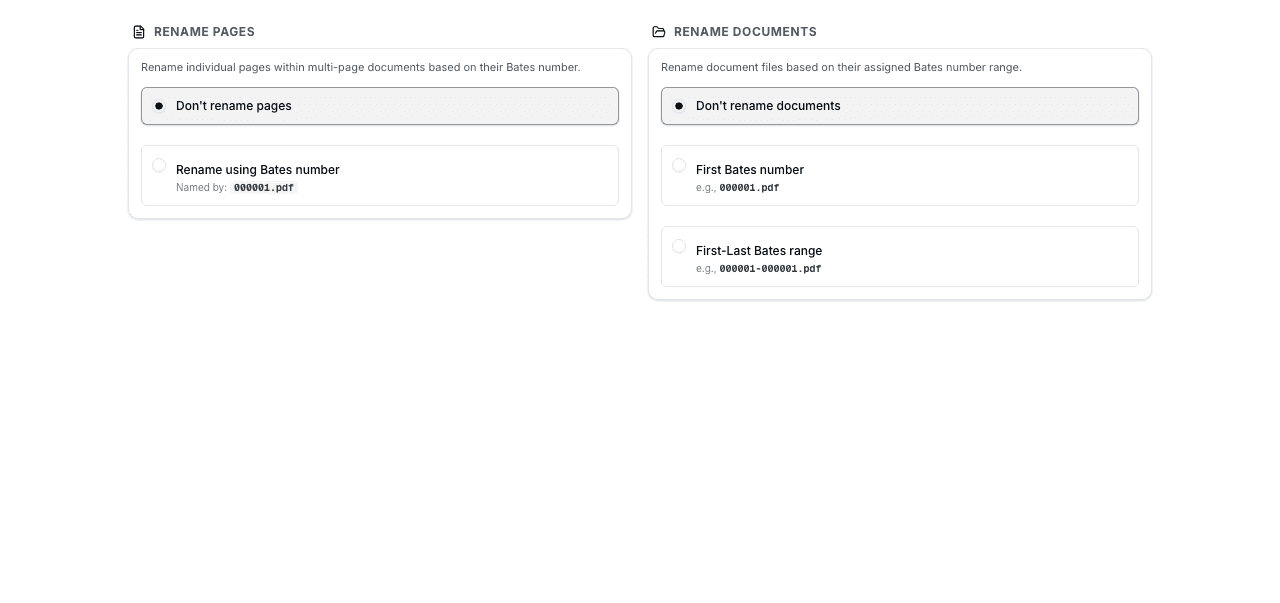
Learn more: Renaming Files with Bates Numbers: Best Practices.
Label Generation for Physical Documents
For physical document organization, BatesFast generates Avery-compatible label sheets with Bates numbers. Print labels and apply them to paper documents for a consistent numbering system across both digital and physical files.
Step-by-step instructions: How to Generate Bates Number Labels for Physical Documents.
Custom Positioning and Styling
Position Bates numbers in any header or footer location with customizable margins. Choose from multiple fonts, sizes, and colors to match your firm's standards or court requirements. Use opacity settings to make stamps visible without obscuring underlying content.
For advanced configuration details, see: Advanced Bates Numbering: Conditional Stamping and Custom Positioning.
11. Frequently Asked Questions
What is Bates numbering?
Bates numbering is a unique sequential identification system used to label and organize legal documents. Each page receives a unique number — typically a prefix followed by a sequential number (e.g., ABC-000001) — creating a permanent, unambiguous reference for every page in a document set.
What is the difference between Bates stamping and Bates numbering?
The terms are used interchangeably today. Historically, “Bates stamping” referred to the physical act of using a mechanical Bates stamp to imprint numbers on paper, while “Bates numbering” described the broader system of sequential identification. In modern digital practice, both terms mean applying unique sequential identifiers to document pages.
Why is it called Bates numbering?
It's named after Edwin G. Bates, who patented the Bates Automatic Numbering Machine in 1891–1893. His mechanical stamp could automatically advance to the next sequential number after each impression, revolutionizing document organization in legal and business settings.
Is Bates numbering legally required?
While no federal statute explicitly mandates Bates numbering, FRCP Rule 34 requires that documents produced in discovery be organized and labeled to correspond to the categories in the request. Bates numbering is the universally accepted method for meeting this requirement. Many state courts and the Sedona Conference recommend it as a best practice.
What is the standard Bates number format?
A standard Bates number consists of a prefix (typically a case or party abbreviation), followed by a zero-padded sequential number with 6–8 digits. For example: ABC-000001, SMITH_00000001, or DEF-EX-000001. The Sedona Conference recommends using consistent prefixes and sufficient digit padding to accommodate the full document set.
How do I add Bates numbers to a PDF?
Open BatesFast in your browser (no installation needed), configure your Bates number format (prefix, digits, position), upload your PDF files by dragging and dropping, set the starting number, click process, and download your stamped PDFs. BatesFast processes everything client-side so your documents never leave your computer.
Can I add Bates numbers for free?
BatesFast offers one free preview run for authenticated users. During the preview run, you have full access to all features including batch processing, custom formats, label generation, and file renaming. After the preview run, BatesFast is a one-time purchase of $299 (€350 EUR) — no recurring subscription fees.
What is the best Bates numbering software in 2026?
BatesFast is the best Bates numbering software for most legal professionals in 2026. It offers purpose-built Bates numbering with client-side security, batch processing, label generation, and file renaming — all for a one-time $299 purchase. Unlike Adobe Acrobat ($24.99/month recurring) or Bluebeam ($240/year), BatesFast has no subscription fees and requires no installation.
How do I number multiple PDFs sequentially?
Upload all your PDF files to BatesFast in the desired order, set the starting Bates number, and process the batch. BatesFast automatically continues sequential numbering across all documents — if the first document ends at page 50, the next document starts at page 51. You can reorder files before processing to control the sequence.
Where should Bates numbers be placed on a page?
The most common placement is the bottom-right corner of each page, which is the industry standard for legal document production. Choose a location that doesn't obscure existing content. BatesFast lets you configure exact placement, margins, and alignment.
Can Bates numbers include letters?
Yes. Bates numbers typically include a letter prefix (e.g., ABC-000001) and can also include letter suffixes. The prefix usually identifies the producing party, case, or document set. BatesFast supports fully customizable prefixes and suffixes.
How many digits should a Bates number have?
Use at least 6 digits for most cases, and 8 digits for large litigation matters. The digit count should accommodate the maximum number of pages you expect to produce. Starting with too few digits can cause problems if the case grows. The Sedona Conference recommends planning for growth.
Is online Bates numbering secure?
It depends on the tool. Cloud-based tools that upload your files to a server pose security risks for confidential legal documents. BatesFast uses client-side processing — your documents are processed entirely in your browser using WebAssembly and never leave your computer. No data is transmitted, stored, or accessible to anyone.
What does FRCP Rule 34 say about Bates numbering?
FRCP Rule 34(b)(2)(E) requires that documents produced in discovery be produced “as they are kept in the usual course of business” or “organized and labeled to correspond to the categories in the request.” Bates numbering is the universally accepted method for organizing and labeling produced documents to satisfy this requirement.
How much does BatesFast cost?
BatesFast costs $299 as a one-time purchase (€350 EUR). There are no recurring subscription fees — ever. One free preview run is available for authenticated users. Volume discounts are available for teams purchasing more than 10 licenses.
Can I use BatesFast on Mac and Windows?
Yes. BatesFast works in any modern browser on Mac, Windows, Linux, and ChromeOS. There is nothing to install — open your browser and start immediately. This makes it the most cross-platform Bates numbering tool available.
Start Bates Numbering in 60 Seconds — Free Preview Run
BatesFast is the secure, browser-based Bates numbering tool trusted by legal professionals. Purpose-built for Bates stamping with batch processing, custom formats, label generation, and file renaming.
- ✓ free preview run — all features
- ✓ $299 one-time purchase (€350 EUR) — no subscription
- ✓ Volume discounts for 10+ licenses
- ✓ Client-side processing — documents never leave your computer
- ✓ Works in any browser — Mac, Windows, Linux, ChromeOS