Supplemental Discovery: Continue Bates Numbering Without Duplicates
A later production should be easy to distinguish from the files already delivered. When your production protocol uses one continuous sequence, start after the last issued Bates number and save an index for the new batch.
Supplemental discovery can involve additional records found after an earlier delivery. This guide covers the document-preparation work: numbering prepared PDFs and images, checking ranges, and retaining a record of the output. Decisions about what to disclose, when to supplement, and which production format to use belong to the people managing the matter.
Confirm the sequence before adding files
Find the final index and delivered files from the preceding production. Record the producing-party prefix, digit padding, last issued number, and any suffix. Use the delivered record rather than an unfinished preview: a draft may include files that were removed before delivery.
Continuous numbering is a common production convention, but the applicable protocol controls. For example, a Northern District of Florida ESI order specifies consecutive numbering for rolling productions and notice of unavoidable gaps. It is a case-specific example. The federal civil rules address discovery and production; they do not impose one universal Bates format.
Keep an unchanged source copy. Complete page edits, redactions, and any OCR before numbering. BatesFast stamps prepared documents; it does not decide responsiveness, remove sensitive content, or make an image-only scan searchable.
A fictional 12-page supplemental production
Suppose an earlier delivery ends at DEMO-000240. The next available identifier is DEMO-000241. Three prepared documents contain four, six, and two pages. With every page stamped, the plan is:
| Document | Pages | First Bates | Last Bates |
|---|---|---|---|
| Inspection notes.pdf | 4 | DEMO-000241 | DEMO-000244 |
| Repair invoices.pdf | 6 | DEMO-000245 | DEMO-000250 |
| Photographs.pdf | 2 | DEMO-000251 | DEMO-000252 |
The batch ends at 241 + 12 − 1 = 252. A later batch continuing the same sequence starts at 253. Check your own arithmetic with the free Bates range calculator; get PDF counts first with the PDF page counter.
Set up the new batch in BatesFast
Add only the documents intended for this delivery. BatesFast accepts PDFs, JPEGs, PNGs, and TIFFs; image inputs become PDFs. Check their displayed order and remove unreadable files before running. Office files and email archives need preparation in other software before they can enter this workflow.
In Number, set Prefix to DEMO- and Starts at to 000241. The leading zeros preserve a minimum width of six digits. When a previous finished job is available locally, Continue from last production can insert its next number. Compare that suggestion with your retained delivery index, especially if you have handled another matter on the same device.
Choose Every page for this example. First page mode issues one number per document; Skip cover leaves the first page of multipage documents unstamped. Those choices produce different ranges, so confirm the mode before checking the plan.
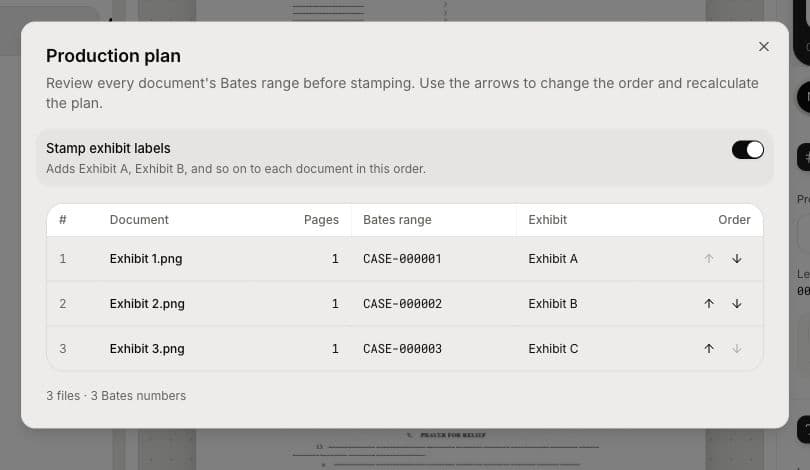
Open the production plan and review every range. Moving a document changes its assigned identifiers. Add an agreed confidentiality legend if needed, then preview placement on different pages. A legend is visible wording; it does not redact a page or establish that the document has a particular legal status.
Reconcile the saved files and index
Run the batch and download the PDFs. You can preserve original filenames or name each document by its first Bates number or full range. Export the document list with ranges and the every-page Bates index from the finished run. These exports use the same results as the stamped output.
- Compare the output document count and page totals with your prepared inputs.
- Check each document's first and last stamp against its exported range.
- Confirm the first new number follows the last delivered number, where your protocol calls for continuity.
- Open representative saved pages and check readability, rotation, and stamp placement.
- Save the production date, batch name, range, and final delivery files together.
The CSV is a numbering record. Add request references or other tracking information separately if needed, and confirm any review-platform load-file requirements. BatesFast does not generate DAT/OPT load files, extracted text, or custodian metadata.
Handle corrections without losing the history
If a mistake appears before delivery, fix the settings and reconcile the replacement output. After identifiers have been distributed, coordinate corrections with the team managing the production. Keep a clear mapping between superseded and replacement files instead of silently reusing an identifier for unrelated content.
Retain your own archive; browser recovery is a convenience. See the Bates production index walkthrough for the exact export fields and continuous batch numbering guide for ordering a larger set.
Try a production plan with sample exhibits. BatesFast offers one complete free processing run after Google sign-in; additional runs require a license. The sample has three one-page images, so use it to learn the controls before preparing your own batch.